
Getting Started on Memory of a Lifetime
Welcome
If you’ve used our previous website, welcome to the updated experience! This page is designed to help you get up and running quickly on the new site. Getting started takes just a few steps: set a new password, choose the account you want to manage, and begin browsing products and placing orders.
Step 1
Set a New Password
To keep your account secure, everyone must set a new password before using the updated website.
You can do this in either of the following ways:
- From your welcome email: Look for the email prompting you to set a new password and follow the link provided.
- Using the password reset option on the website: Click “Forgot password?” on the login screen and follow the instructions.
Step 2
Choose an Account to Manage
After logging in, you may be prompted to choose an account.
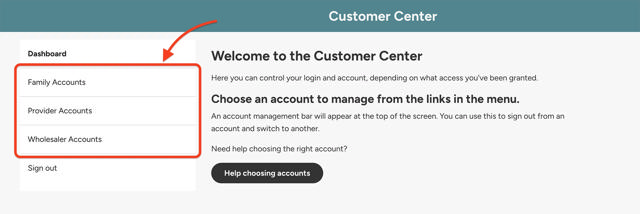
If you see this screen, it means you can manage multiple accounts with a single login.
- Click on one of the menu options
- Select the company name you normally use to place orders

You can switch between accounts at any time using the Account Management Bar at the top of the site.
Step 3
Browse Products and Place Orders
Once your password is set and your account is selected, click Products in the main navigation to start browsing.
From there, you can:
- Search for products
- Filter by product details and availability
- Add items to your cart and place orders
Need More Help?
If you need help with a specific topic, visit our full library of step‑by‑step guides.
Having Trouble Logging In?
If you’re experiencing login issues or need additional assistance:
- Reach out to our support team using the form below, or
- Call Terrybear Customer Support at 1‑888‑588‑8767
We’re here to help and are excited to support you as you get started on the new website.